Solving Spark error: “detected implicit cartesian product for FULL OUTER join between logical plans"

Error

I encountered an error when I want to outer join two dataframes using PySpark.

joined_df = (
    df1
    .join(df2), how='outer')
)

org.apache.spark.sql.AnalysisException:
detected implicit cartesian product for FULL OUTER join between logical plans

Solution

To enable crossJoin in SparkSession can solve this problem.

spark.sql.crossJoin.enabled: true

Code example

spark = (
    SparkSession
    .builder.appName('my_spark')
    .config("spark.sql.crossJoin.enabled", "true")
    .getOrCreate()
)

Solving Spark error: “Cannot broadcast the table that is larger than 8GB"

Error

Although I have already set crossJoin.enable to true and autoBroadcastJoinThreshold to -1, I still got an error.

spark = (
    SparkSession
    .builder.appName('my_spark')
    .config("spark.sql.crossJoin.enabled", "true")
    .config("spark.sql.autoBroadcastJoinThreshold", '-1')
    .getOrCreate()
)

java.util.concurrent.ExecutionException:
org.apache.spark.SparkException: Cannot broadcast the table that is larger than 8GB: 8 GB

This error is due to default PySpark broadcast size limit which is 8 GB.

Solution

There is no specific code or config we can set to solve this problem (at least I didn’t find one).

What we can do is to optimize our code.
Here are some of my ideas.

  • Use select(cols) or selectExpr(cols) to choose the columns we actually need before join to reduce the dataframe’s size.
  • Use filter(expr) to filter out what data we don’t need.
  • Use normal df1.join(df2) instead of using df1.join(broadcast(df2)).

I selected less columns of my dataframe (from 7 cols to 3 cols) to solve my problem.

Solving Spark error: “TaskMemoryManager: Failed to allocate a page"

Error

This error occurs endlessly during PySpark code running.

TaskMemoryManager: Failed to allocate a page.

Solution

I added one spark config in SparkSession that solved my problem.
Set autoBroadcastJoinThreshold to -1.

“spark.sql.autoBroadcastJoinThreshold": ‘-1’

Code example

spark = (
    SparkSession
    .builder.appName('my_spark')
    .config("spark.sql.autoBroadcastJoinThreshold", '-1')
    .getOrCreate()
)

Solving Spark error: “Decompression error: Version not supported" on GCP Dataproc

My gcloud command on terminal to create cluster

sudo gcloud dataproc clusters create my-project \
    --bucket my-bucket \
    --project my-gcp-project \
    --region asia-east1 \
    --zone asia-east1-b \
    --image-version=2.0-ubuntu18 \
    --master-machine-type n1-highmem-8 \
    --master-boot-disk-size 30 \
    --worker-machine-type n1-highmem-8 \
    --worker-boot-disk-size 100 \
    --num-workers 6 \
    --metadata='PIP_PACKAGES=xxhash' \
    --optional-components=JUPYTER \
    --initialization-actions gs://goog-dataproc-initialization-actions-asia-east1/python/pip-install.sh
    --subnet=default


Error

This error occurs during specific PySpark code running.

java.io.IOException: Decompression error: Version not supported

Solution

Change image-version from 2.0-ubuntu18 to 2.1-ubuntu20 can solve this version not supported error.

--image-version=2.1-ubuntu20 \

2022 年 Kaggle 資料科學 & 機器學習現況調查

每年底 Kaggle 都會在網站上做問卷調查,去年底的調查總共收集了 23,997 份來自 173 個不同國家的回覆,我這次用圖文整理翻譯了一些重點。

  1. 1. Kaggle 數據競賽平台現況
  2. 2. 性別趨勢
  3. 3. 居住地
  4. 4. 程式語言熱門度
  5. 5. IDE 工具熱門度
  6. 6. 雲端筆記本
  7. 7. 機器學習框架
  8. 8. Transformer
  9. 9. 雲端服務
  10. 10. Tensor Processing Unit (TPU) 
  11. 參考資料

1. Kaggle 數據競賽平台現況

  • 資料科學家 > 1000 萬名
  • ML 競賽 300+ 場
  • 公開資料集數量 > 17 萬
  • 公開程式碼數量 > 75 萬

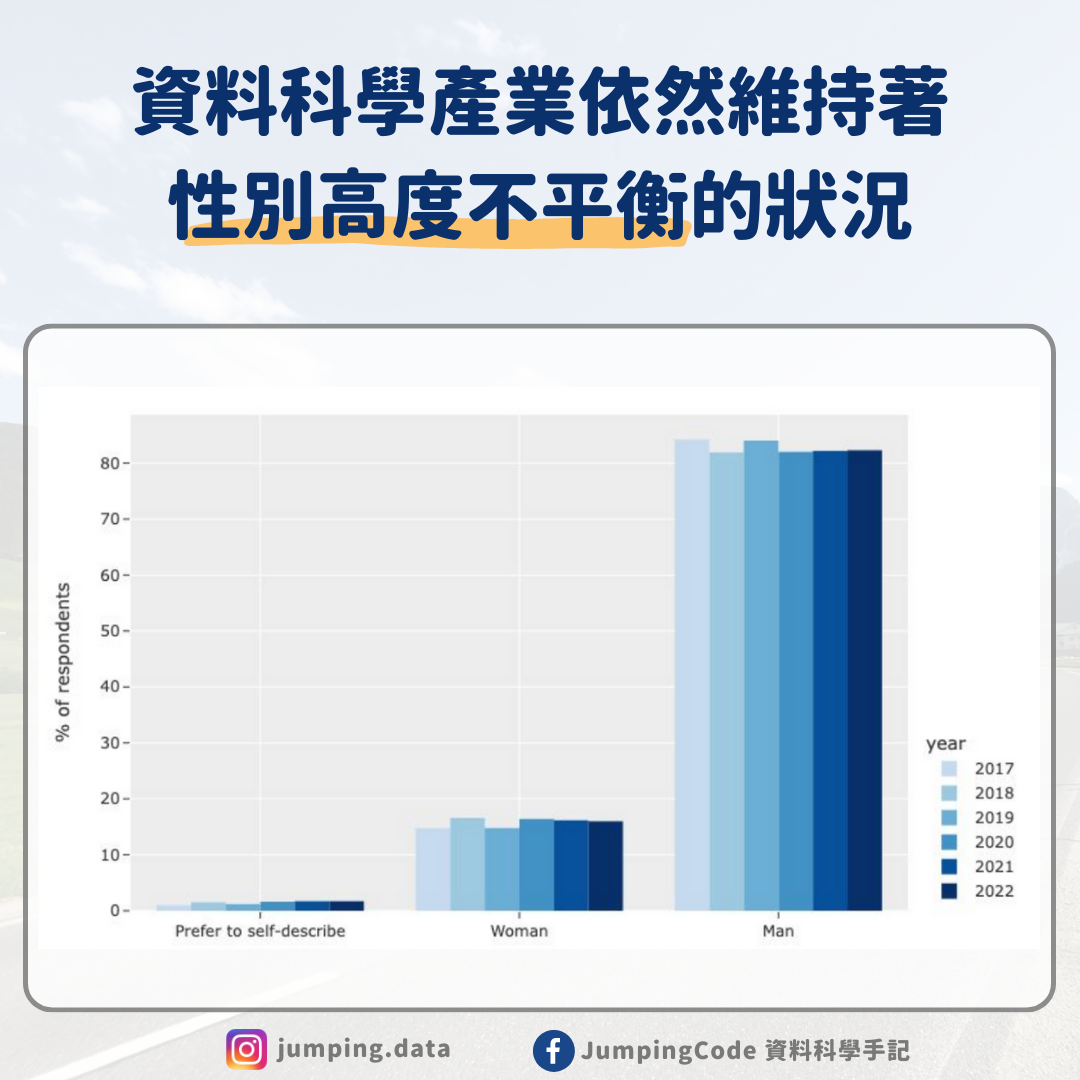
2. 性別趨勢

資料科學產業依然維持著性別高度不平衡的狀況

閱讀更多»